MAPTATVA / PRODUCT GUIDE
Draft Studio | Online CAD Drafting from 3D Models
Use Draft Studio to prepare drawings from a photogrammetry model. Set up plan, elevation and section planes, extract measured views and arrange them on a drawing sheet in your browser.
Explore the Maptatva platform →
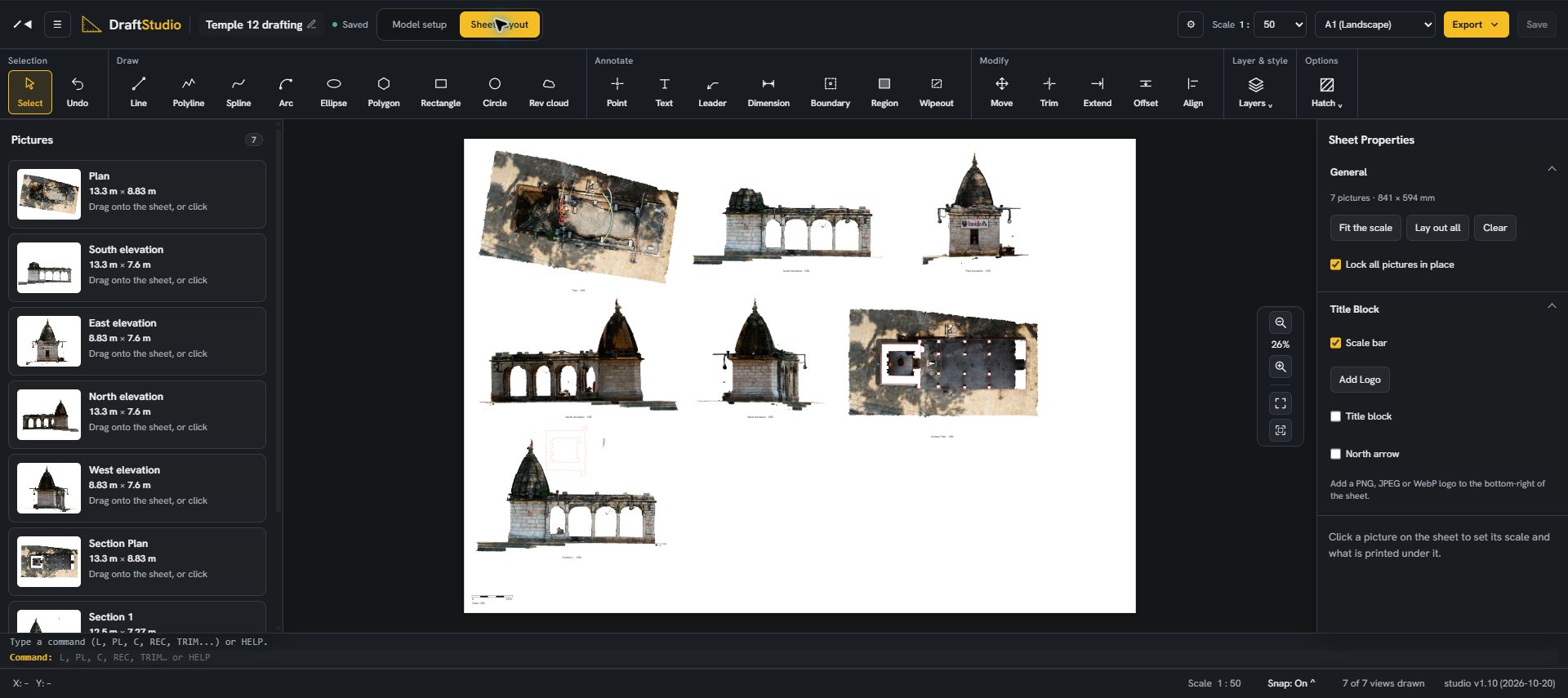
Set the model up for drawing
Start with a 3D model and orient the drawing planes to the structure. Select the views required for the documentation task, such as a plan, facade elevations or sections. The accuracy and completeness of the source model affect what can be drawn from it.
Move from views to a sheet
Extract the measured views and arrange them on a sheet. Choose a drawing scale and prepare the layout for delivery. Draft Studio brings the model setup and drawing sheet into the same workflow, reducing the need to pass screenshots between separate applications.
Prepare heritage and structure documentation
Temple, fort and building surveys often need both a textured model and readable drawings. Use the model to understand the structure, then prepare plans, elevations and sections for review. Check drawing scale and dimensions against the survey requirements before issue.
Open the drafting workspace
Draft Studio is part of the Maptatva platform and has its own workspace at draft.maptatva.com. Review current subscription limits on the pricing page, or start a trial to evaluate the workflow with your own survey data.